How to Read a Turnitin Report: Similarity Score & AI Indicator
Introduction
If you’ve ever submitted an assignment through your university’s learning management system, you’ve likely encountered Turnitin. This widely-used plagiarism detection tool has become an essential part of academic life, helping educators maintain academic integrity while providing students with valuable feedback on their writing. However, many students find themselves confused when they first open a Turnitin report, staring at percentages and color-coded indicators without fully understanding what it all means.
Understanding how to read a Turnitin report is crucial for every student. Not only does it help you avoid unintentional plagiarism, but it also teaches you proper citation practices and improves your overall academic writing skills. In this comprehensive guide, we’ll break down every component of the Turnitin report, from the similarity score to the increasingly important AI indicator, empowering you to interpret your results with confidence.
The academic landscape has evolved significantly in recent years, with tools like grubby ai and rewritify ai emerging to help students refine their writing. While these tools can be helpful for improving clarity and structure, it’s essential to understand what Turnitin actually detects so you can maintain academic honesty while producing your best work.
What is Turnitin?
Turnitin is a cloud-based plagiarism detection service used by educational institutions worldwide. Founded in 1997, it has become the gold standard for academic integrity verification, processing millions of submissions annually across K-12, higher education, and professional development contexts.
When you submit a document to Turnitin, the system compares your writing against an extensive database that includes:
- Internet sources (websites, blogs, forums)
- Previously submitted student papers
- Academic publications and journals
- Books and educational content
- Commercial document databases
The result is a detailed similarity report that highlights potentially unoriginal content, giving both students and instructors insight into the originality of the work.

Understanding the Similarity Score
What Does the Percentage Mean?
The similarity score, displayed as a percentage, represents the amount of your submitted document that matches other sources in Turnitin’s database. It’s important to understand that this percentage alone doesn’t determine whether plagiarism has occurred—context matters significantly.
How the score is calculated:
Turnitin calculates the similarity percentage by dividing the number of matching text characters by the total number of characters in your document, then multiplying by 100. The system identifies matches based on sequences of identical words and phrases.
Score ranges and their meanings:
| Similarity Score | Interpretation |
|---|---|
| 0-10% | Generally acceptable; likely includes properly cited sources |
| 11-25% | May require review; check that all sources are properly cited |
| 26-50% | Moderate similarity; review matches and ensure proper attribution |
| 51-75% | High similarity; significant revision and citation review needed |
| 76-100% | Very high similarity; likely indicates plagiarism issues |
Color-Coded Indicators
Turnitin uses a traffic light system to quickly identify match severity:
- Blue text: Quotes and citations—matches are properly attributed
- Green text: Cited sources—matches are from properly referenced material
- Yellow text: Quotations—matches include quotation marks but may need additional citation
- Orange text: Paraphrasing—matches show similar ideas but different wording
- Red text: Direct matches—unattributed text that requires attention
The AI Indicator: A New Frontier
What is the AI Indicator?
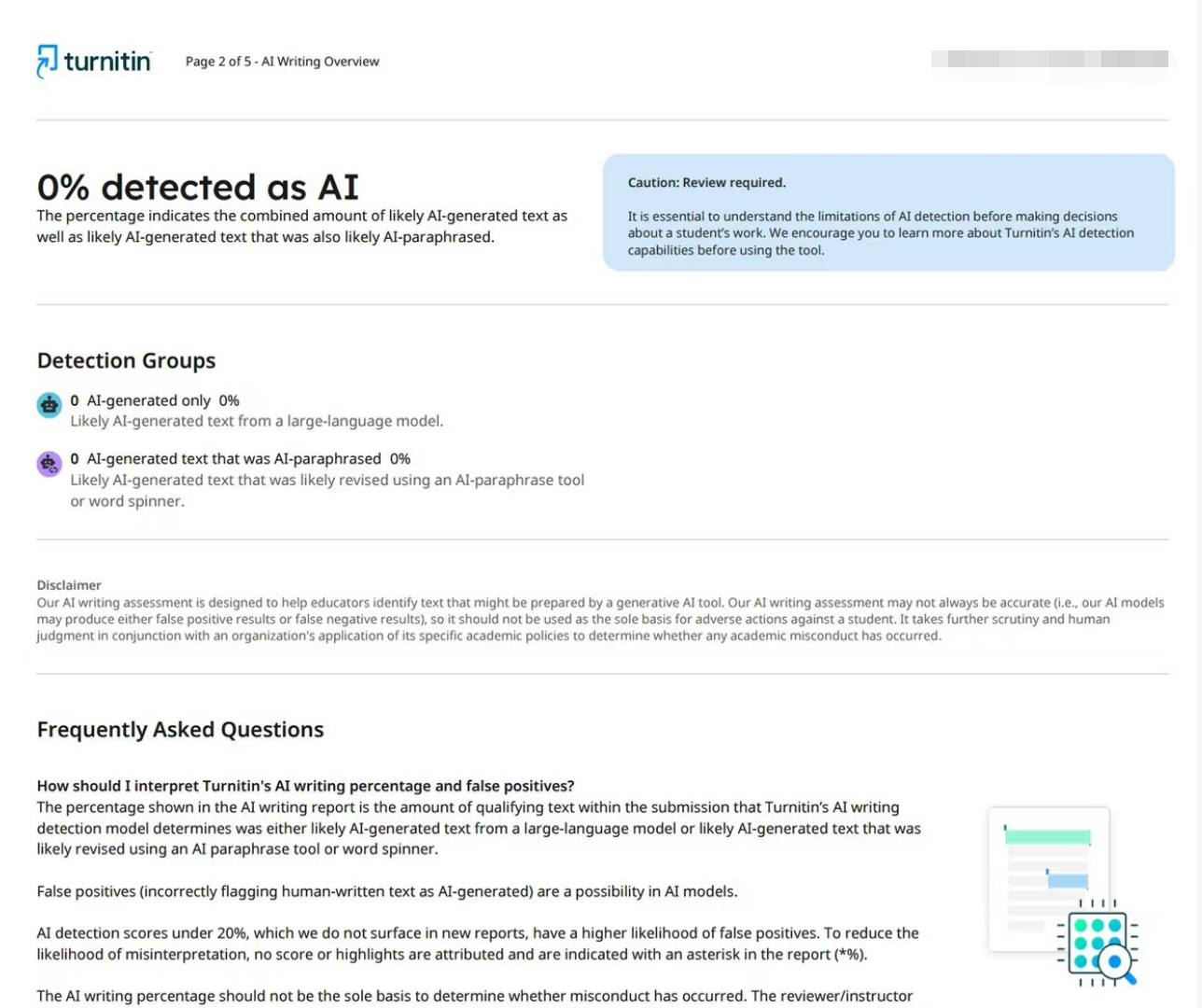
In response to the growing prevalence of AI writing tools like ChatGPT and similar technologies, Turnitin introduced its AI writing detection indicator in 2023. This feature analyzes text to determine the likelihood that it was generated by artificial intelligence rather than written by a human.
The AI indicator appears as a separate percentage showing how much of your document may have been AI-generated. Turnitin claims an accuracy rate of approximately 98% for identifying AI-generated content, though the feature is continually being refined.
Why Was It Introduced?
The proliferation of AI writing assistants created significant challenges for academic integrity. Students could potentially use tools to generate entire essays or significantly rewrite their work without human input. The AI indicator helps instructors identify:
- Fully AI-generated submissions
- Mixed content (human and AI writing)
- AI-assisted paraphrasing
Interpreting AI Indicator Results
The AI indicator shows a percentage alongside your similarity score. Key considerations include:
- Low percentage (0-20%): Suggests primarily human-written content
- Moderate percentage (21-50%): May indicate AI-assisted sections
- High percentage (51%+): Significant portions likely AI-generated
It’s worth noting that the AI indicator is controversial. Critics argue that: - AI detection tools can produce false positives
- Human writing can sometimes trigger false alerts
- The technology is still evolving and may not be entirely reliable
How to Read Your Turnitin Report in Detail
Step-by-Step Analysis
When you access your Turnitin feedback report, follow these steps:
1. Review the Overall Similarity Score
Start by noting your overall percentage. This gives you a general sense of how much matching content exists in your document.
2. Examine the Match Categories
Look at the breakdown showing which categories contribute to your similarity score. This helps identify where most matches occur.
3. Click on Individual Matches
For each highlighted section, click to see:
- The source of the match
- The percentage of similarity
- The specific matching text
- Context of the original source
4. Assess Each Match
For each match, determine: - Is the source properly cited in your bibliography?
- Is the citation format correct?
- Does the match represent acceptable paraphrasing or direct quotation?
- Do you need to revise or add citations?
5. Review the AI Indicator
Check the AI writing percentage separately. If it’s high, consider which sections might need revision to better reflect your own writing voice.
Common Scenarios and What They Mean
Scenario 1: High Similarity with Proper Citations
If your similarity score is high but you’ve properly cited all sources, you likely have extensive quotations or heavily referenced work. This isn’t necessarily a problem, but consider whether you could benefit from more original analysis.
Scenario 2: Moderate Similarity from Common Knowledge
Common knowledge doesn’t require citation. If your matches come from widely known facts, this is generally acceptable. However, be cautious—what you think is common knowledge might not be.
Scenario 3: Uncited Quotes
Finding uncited quotes is a common issue. If text appears in quotation marks but isn’t attributed, you need to add citations immediately or rephrase in your own words.
Scenario 4: High AI Indicator Despite Original Writing
Some students report high AI indicator scores despite writing everything themselves. This can occur if:
- Your writing style is very formulaic
- You used writing assistance tools (including grubby ai or rewritify ai) for refinement
- The text includes technical or highly structured content
If you believe this is an error, document your writing process to demonstrate your original work.
Tips for Reducing Your Similarity Score
Effective Strategies
- Paraphrase Effectively: Don’t just change a few words. Completely reframe ideas in your own voice while maintaining accuracy.
- Use Quotations Sparingly: Direct quotes should be limited and always properly cited.
- Cite Properly: Ensure every source appears in your bibliography and in-text citations match.
- Add Your Analysis: Include more original thoughts, interpretations, and connections between ideas.
- Use Multiple Sources: Rather than relying heavily on one source, consult multiple references.
- Proofread and Revise: Review your work to ensure consistent voice and style throughout.
Tools That Can Help
While you should never use AI tools to generate content, certain writing assistants can help you refine your work legitimately. Tools like grubby ai can help with grammar and clarity, while rewritify ai might assist with restructuring sentences. However, always ensure any tool you use enhances rather than replaces your own intellectual contribution.
Conclusion
Understanding your Turnitin report is an essential skill for academic success. The similarity score and AI indicator work together to give educators a comprehensive view of your work’s originality, but interpreting these metrics requires nuance and understanding.
Remember that a high similarity score doesn’t automatically mean plagiarism—it often indicates proper use of sources that need better integration or citation. Similarly, the AI indicator should be viewed as one data point among many, not a definitive judgment.
By learning to read your Turnitin report thoroughly, you become better equipped to produce original, well-cited academic work. Use the report as a learning tool to understand proper citation practices, improve your paraphrasing skills, and develop your unique academic voice.
Frequently Asked Questions (FAQ)
1. What is a good similarity score on Turnitin?
A similarity score between 0-15% is generally considered good, as it indicates minimal matching content and proper citation practices. However, acceptable scores vary by institution and assignment type.
2. Can Turnitin detect AI-written content?
Yes, Turnitin’s AI indicator can detect content likely generated by AI tools. However, the detection is not 100% accurate and may produce false positives or negatives.
3. How accurate is the Turnitin similarity score?
The similarity score is highly accurate in detecting matching text. However, accuracy in identifying plagiarism depends on context, proper citation, and the quality of sources in Turnitin’s database.
4. Will Turnitin penalize me for using tools like grubby ai or rewritify ai?
Using editing and refinement tools is generally acceptable, but submitting AI-generated content as your own original work violates academic integrity policies.
5. How long does it take to get Turnitin results?
Typically, Turnitin processes submissions within minutes to a few hours, depending on document length and server load.
6. Can I resubmit my paper to Turnitin?
Most institutions allow resubmission, but Turnitin creates a repository record of your submission. Check your institution’s policy on multiple submissions.
7. Does Turnitin check against all websites?
Turnitin checks against internet sources, academic databases, and its repository of student submissions, but it doesn’t access paywalled content or the entire internet.
8. What should I do if I disagree with my Turnitin report?
Contact your instructor to discuss your concerns. Provide evidence of your writing process, including drafts and notes, if you believe there’s an error.
Tools for Academic Excellence
Looking to improve your academic writing while maintaining integrity? Consider these legitimate writing assistance tools:
- Try Your Best grubby ai: An AI-powered grammar and clarity checker that helps refine your writing without generating content
- Try Your Best rewritify ai: A tool for restructuring and improving sentence flow while keeping your original ideas intact
These tools can help you become a better writer while ensuring your submissions reflect your own thoughts and analysis. Remember, the goal is to enhance your skills, not replace your intellectual effort.